Mosara ABA

For ABA practices

Your therapists write. We check every note against payer rules, built on Georgia Medicaid’s ABA manual today. Your BCBA signs off.

Click through it as an owner, BCBA, RBT or parent. Fake data, nothing to install. Start free trial · Log in
Demo and trials use sample data only. Real patient information isn’t accepted yet.

01

Catch mistakes before signing.

Missing signatures, vague summaries, wrong codes. Each one is flagged in plain English before the note is signed, so your team can fix it.

Sample data. Passing the checks is not a payer audit result.

02

Notes in 2 minutes.

A short step-by-step flow on any phone. The session details fill in on their own.

03

Supervisors review only what needs them.

Notes reach your BCBA already checked. Approve, or send it back with a comment.

04

Owners see every late note.

Late notes rise to the top, and reminders move up the chain on their own: therapist, supervisor, owner. Billable hours, cancellations and claim revenue are on the same dashboard.

05

Works alongside Rethink and CentralReach.

Moving over from another system? Keep using it while your team switches to Mosara.

Everything else

One app for the whole practice.

Notes are where it starts. Scheduling, data, billing, payroll, hiring and your numbers live here too.

Scheduling

  • Week and day calendar with recurring sessions for each client and therapist
  • Staff availability, with a warning before you double-book
  • Cancellations tracked by who and why, late cancels flagged, cancel rate
  • Multiple locations, rooms and teams

Data collection & graphs

  • RBTs tap trials, behaviors, timers and task steps on their phone, live in the session. Measures today: discrete trials, frequency, duration, partial interval and task analysis
  • Auto line graphs for every target, with phase lines for BCBAs
  • Parent portal: parents see their child’s schedule, sign session notes and follow progress

Authorizations, billing & payroll

  • Authorization tracking: units left, burn rate, alerts at 80% and 90% used and 30 days before expiry
  • Claims built from approved notes, tracked from ready to paid or denied
  • Payroll export: hours from signed notes, drive time, Gusto- and ADP-style CSV
  • Electronic claim submissionComing soon

Your team & your numbers

  • Hiring: job posts, an applicant board from applied to hired, interview notes
  • Credential alerts: RBT/BCBA, CPR and licenses, at 60, 30 and 7 days before they expire
  • Owner dashboard: billable hours, cancellations, claim revenue, authorization use, staff utilization
  • Running background checksComing soon

Live demo · no sign-up

Click through every screen yourself.

Pick who you want to be at a sample practice. You get your own private copy with fake data: audit notes, co-sign, book sessions, tap data, build claims, hire, run payroll. Nobody else sees what you change.

Watch

See it in 30 seconds

Pick your role and press play.

Product walkthrough — preview of the app. Sample data, not real clients or customers.

For therapists (RBTs): finish your note in 2 minutes

  1. Open today’s session. The details fill in for you.
  2. Add your data and write two sentences.
  3. Mosara flags what’s missing, like who was present or units that don’t match the time.
  4. One tap fixes each one.
  5. All clear. Sign unlocks.

About 30 seconds · captions on screen · no sound

The details

Why ABA owners switch.

Issues flagged before signing. No chasing late notes. Every note checked the same way, every time.

How it works

  1. Write. Right after the session, the therapist follows the steps for that service code on their phone.
  2. Check. Every note is checked against your payer rules and your own practice rules. It can’t be signed until the flags are fixed.
  3. Review. The BCBA uses their clinical judgment: approve, or send it back with a comment.

Late notes chase themselves

  1. 0 minSession ends. The therapist gets a nudge.
  2. 30 minNote due (your default; you set it). Payer deadlines are tracked too.
  3. 2 hrsStill late: the supervisor is notified.
  4. 24 hrsStill late: the owner is notified.
  • Client and caregiver appointment remindersComing soon

Rules from the manual, not from memory

Each rule pack is built from the payer’s policy manual and versioned, and every check shows the section it comes from. Checks help your team catch issues; they don’t replace your BCBA’s review or a payer’s decision.

  • Service code vs. credential level, modifiers, daily unit caps
  • Authorization dates and units remaining
  • Required note elements for each code
  • Copied, pre-written or vague documentation
  • Deadlines with your holidays counted

Georgia Medicaid, built in today: rules from Georgia’s ASD/ABA policy manual, including Georgia modifiers, daily unit limits, group sizes, required note elements by code, and Georgia license tracking. It doesn’t claim to cover every rule in the manual. Other states: coming. Commercial payers: on request. Your practice rules: you set them. Tell us your state and payers.

The right people see the right things

  • Separate logins and roles. Owner, BCBA and RBT each see only their own practice’s clients and notes.
  • Locked notes keep versions. Corrections become a new version; the original stays.
  • BAA before real client data. A BAA and full security details are available on request. Ask for them here.
  • No patient information here. Please keep client details out of demo requests and emails.

Help when you need it

  • Watch now30-second video tours for every role. Watch them
  • Coming soonAsk Mosara, a help assistant inside the app
  • Coming soonA plain-English manual for every screen and rule

What’s next · 6 live now, 7 coming soon

What’s next for Mosara.

Thirteen features we’re building. Six are live in the app now (marked “New — live now”); the other seven are marked “Coming soon” until they ship. The screenshots come from our preview, which uses sample data.

See the interactive preview

Opens in a new tab. A preview with sample data, not the live product.

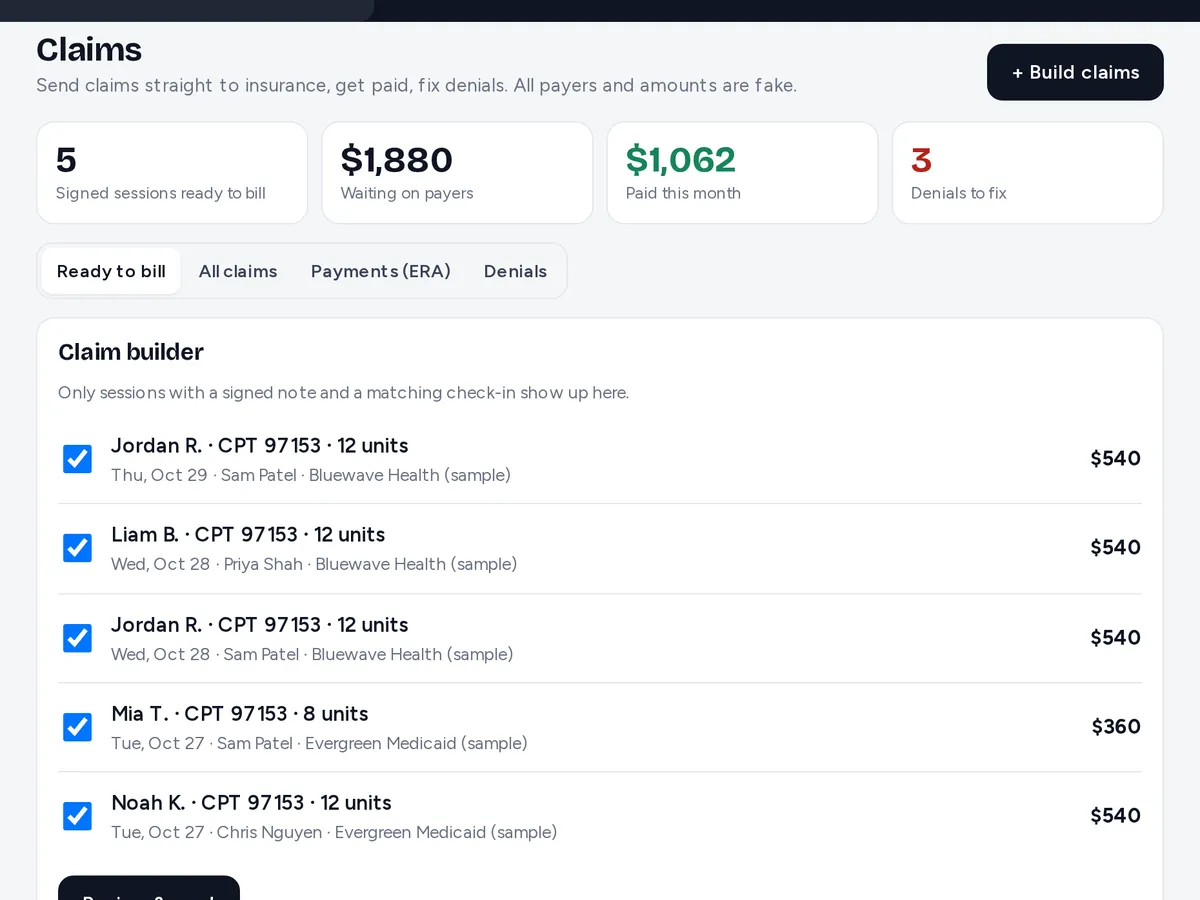
Preview with sample data: Claims screen with statuses: accepted, paid and denied
Preview — sample data
01Coming soon

Claims straight to insurance

Build claims from signed sessions and send them to payers electronically. Payments post themselves from the ERA, and denials land in a worklist with the reason and the fix.

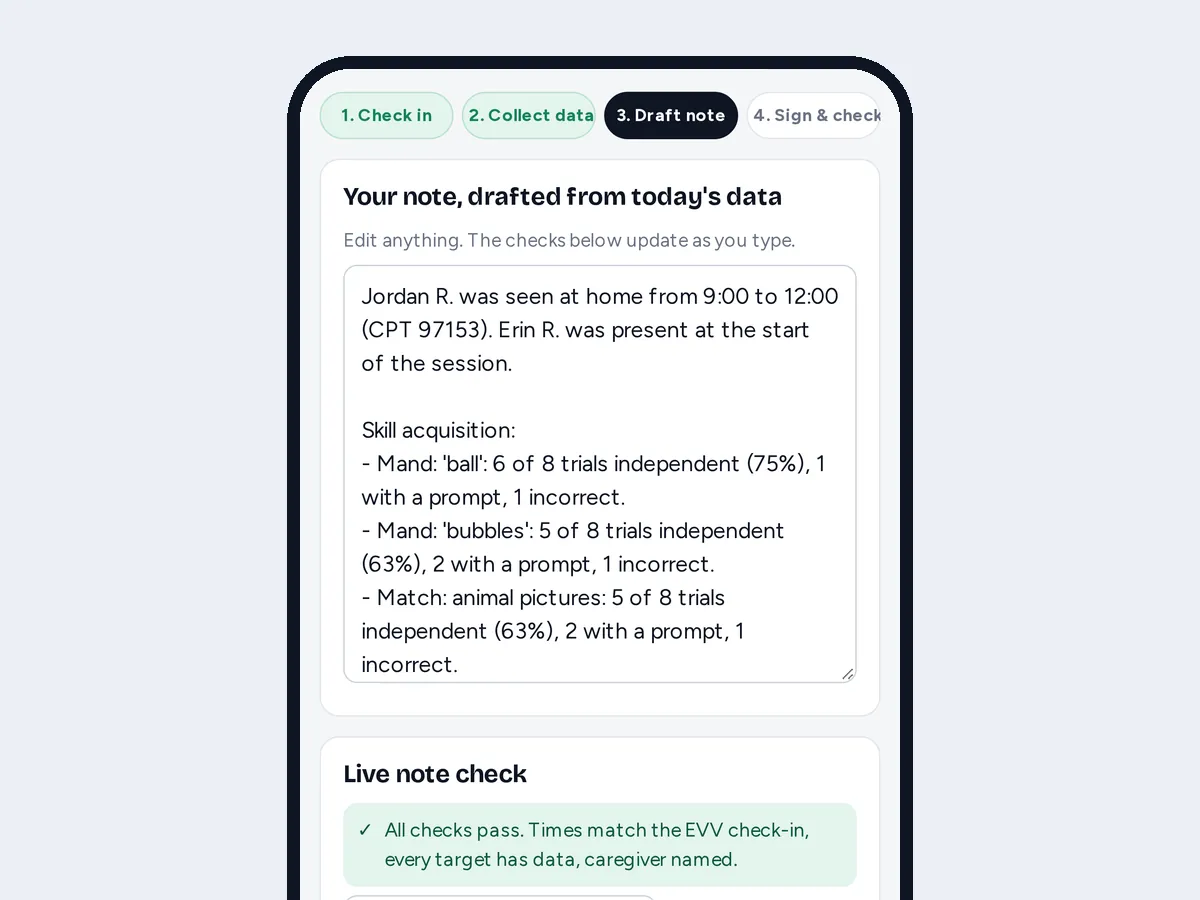
Preview with sample data: A session note drafted from the session’s trial data on a phone
Preview — sample data
02New — live now

Session notes that draft themselves

RBTs tap trial data during the session, and Mosara drafts the note from that data with a fixed template (no AI). They edit, the live note check runs, and they sign.

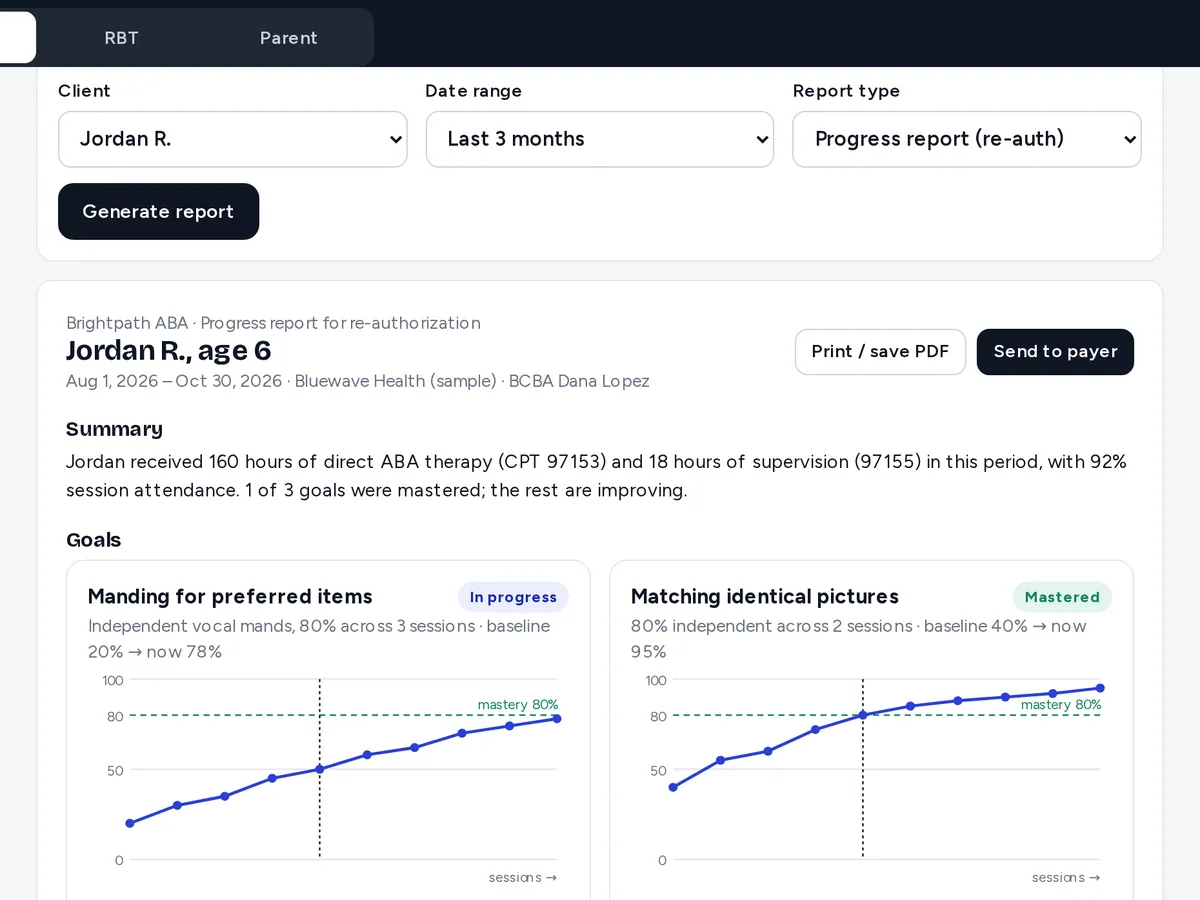
Preview with sample data: Progress report built from a client’s goals and graphs
Preview — sample data
03New — live now

Treatment plans + progress reports

Write the treatment plan from the client’s goals and mastery criteria. Then pick a date range, and goals, graphs and mastery come together into a printable progress report for re-authorization.

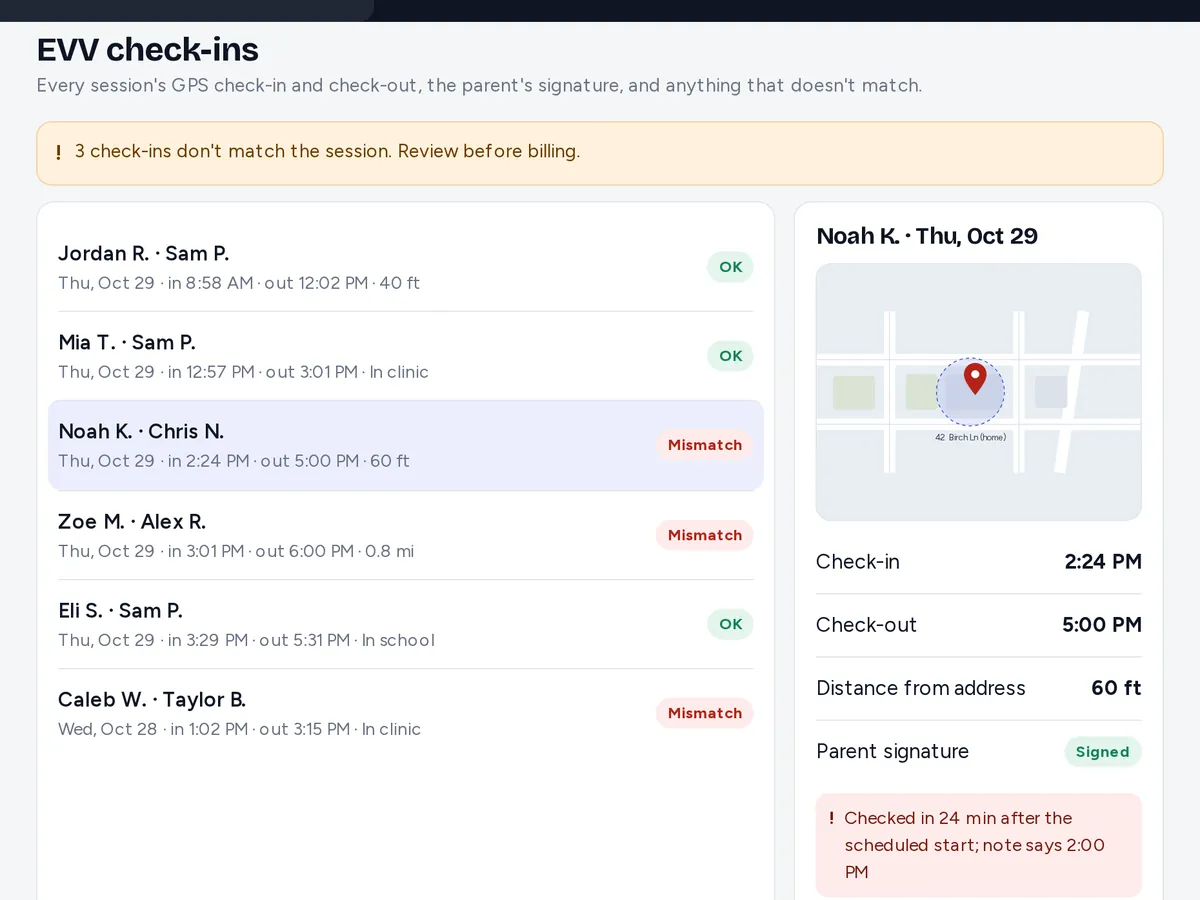
Preview with sample data: Visit list with check-in times, locations and flags
Preview — sample data
04New — live now

EVV-ready check-in with GPS

EVV-ready check-in for payers that ask for it: check in and out with a GPS pin and the time, an optional caregiver signature at the end, and mismatches flagged for review. EVV isn’t currently required for ABA in Georgia or Florida.

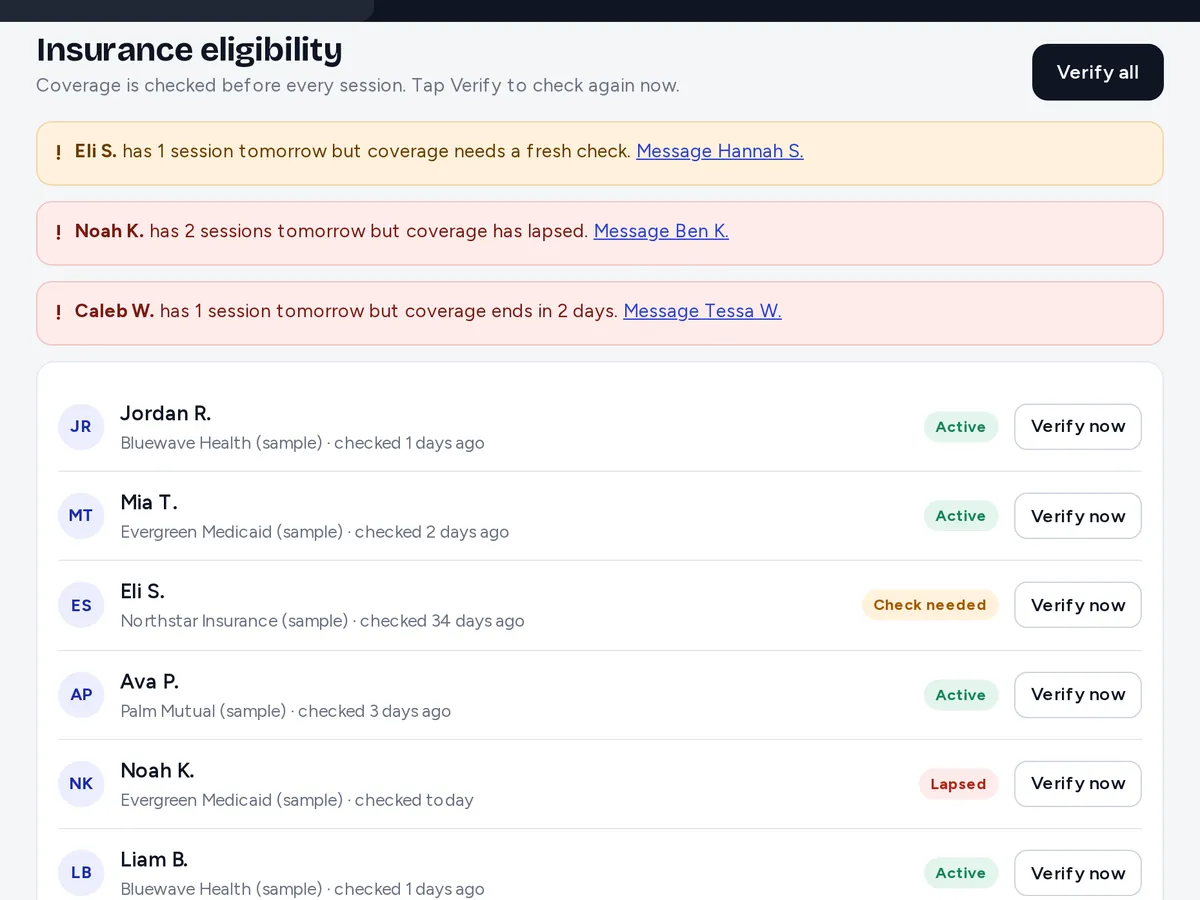
Preview with sample data: Coverage status for each client with verify buttons
Preview — sample data
05Coming soon

Eligibility checks before sessions

See each client’s coverage, verify it in one tap, and get a heads-up when tomorrow’s schedule includes a lapsed plan.

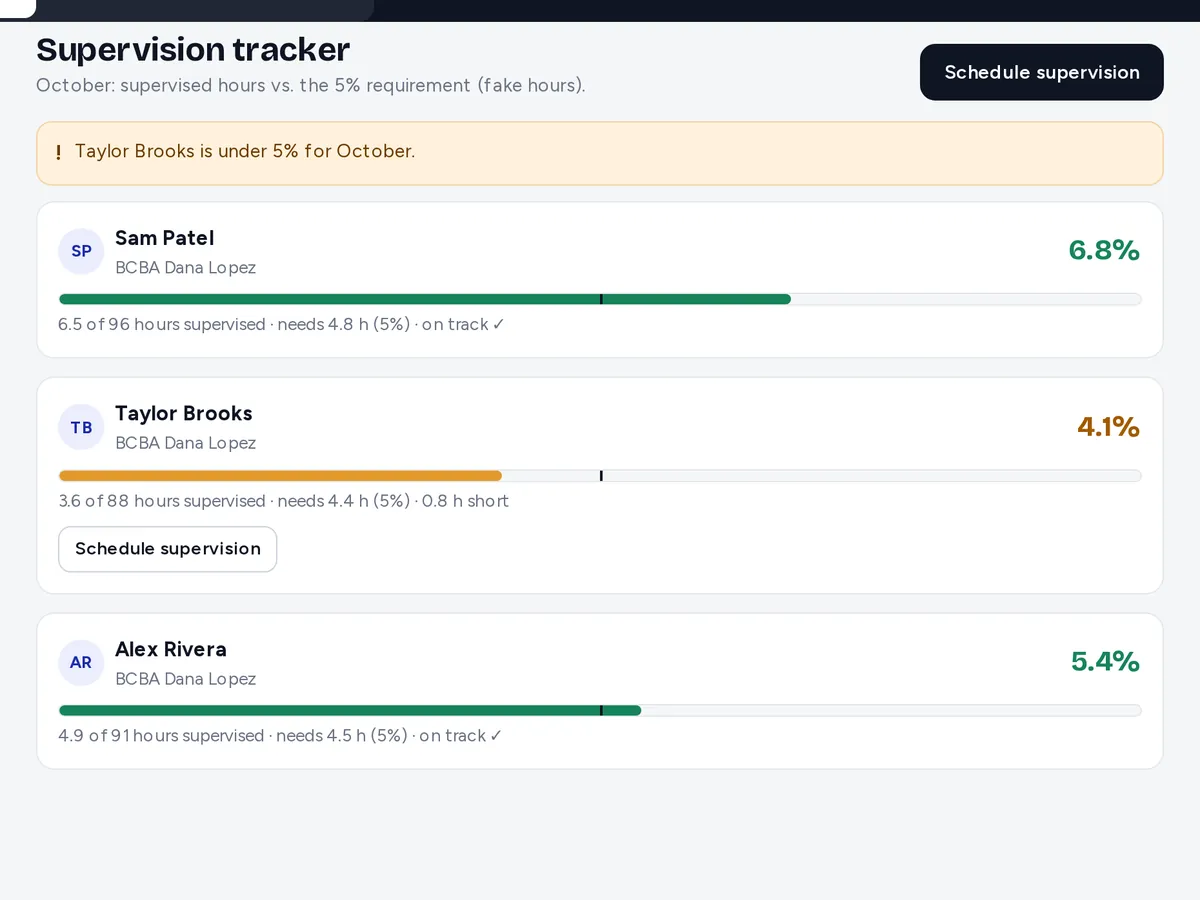
Preview with sample data: Supervision progress bars per RBT against the BACB 5% RBT supervision minimum
Preview — sample data
06Coming soon

Supervision tracker

Each RBT’s supervised hours this month against the BACB 5% RBT supervision minimum, with alerts before anyone falls short.

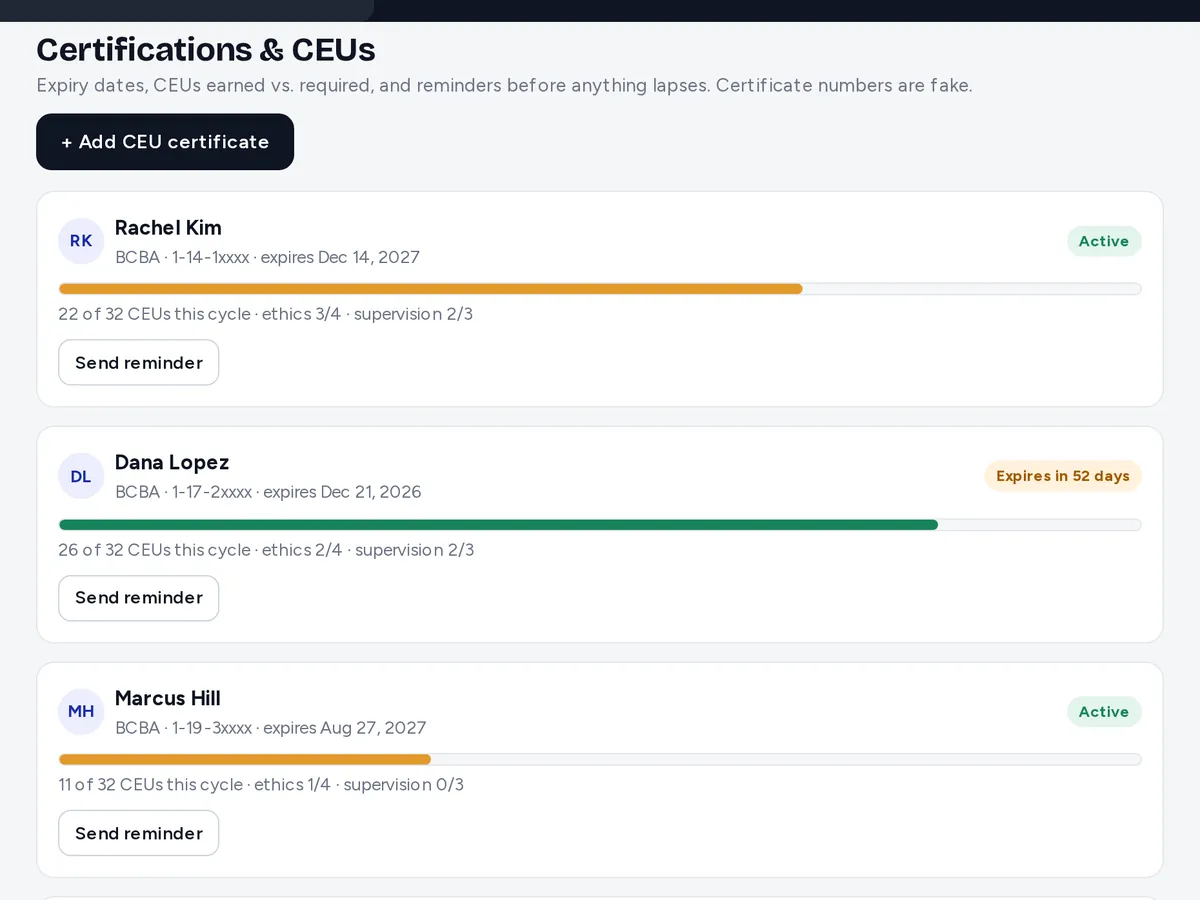
Preview with sample data: Certification expiry dates, BCBA CEU progress and RBT renewal steps
Preview — sample data
07Coming soon

BCBA CEUs + RBT renewals

Adds to today’s credential alerts: CEUs earned against required for each BCBA, annual renewal tracking for each RBT (competency assessment and renewal application), and reminders before anything is due.

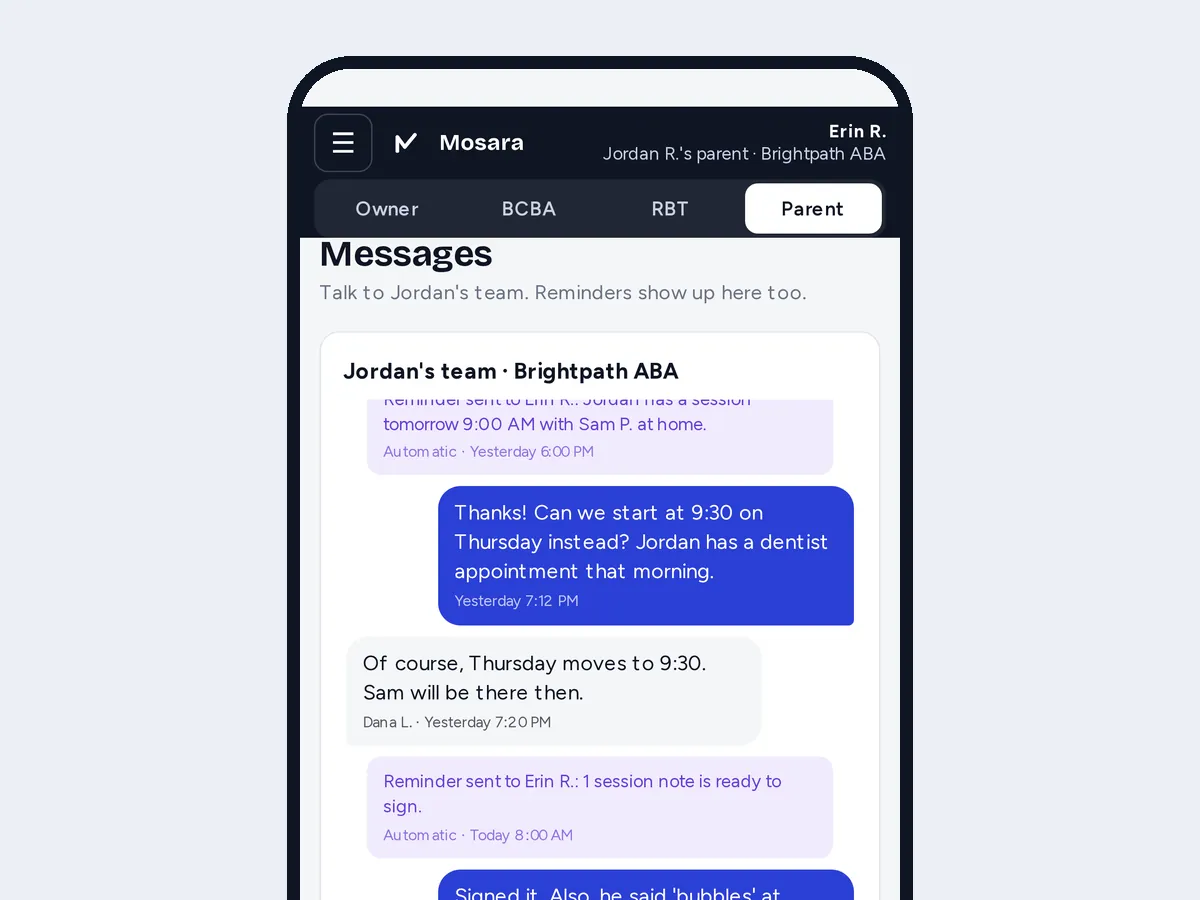
Preview with sample data: Message thread between a family and the practice on a phone
Preview — sample data
08Coming soon

Parent reminders + messaging

Automatic reminders for tomorrow’s session and notes to sign, plus a two-way message thread with every family.

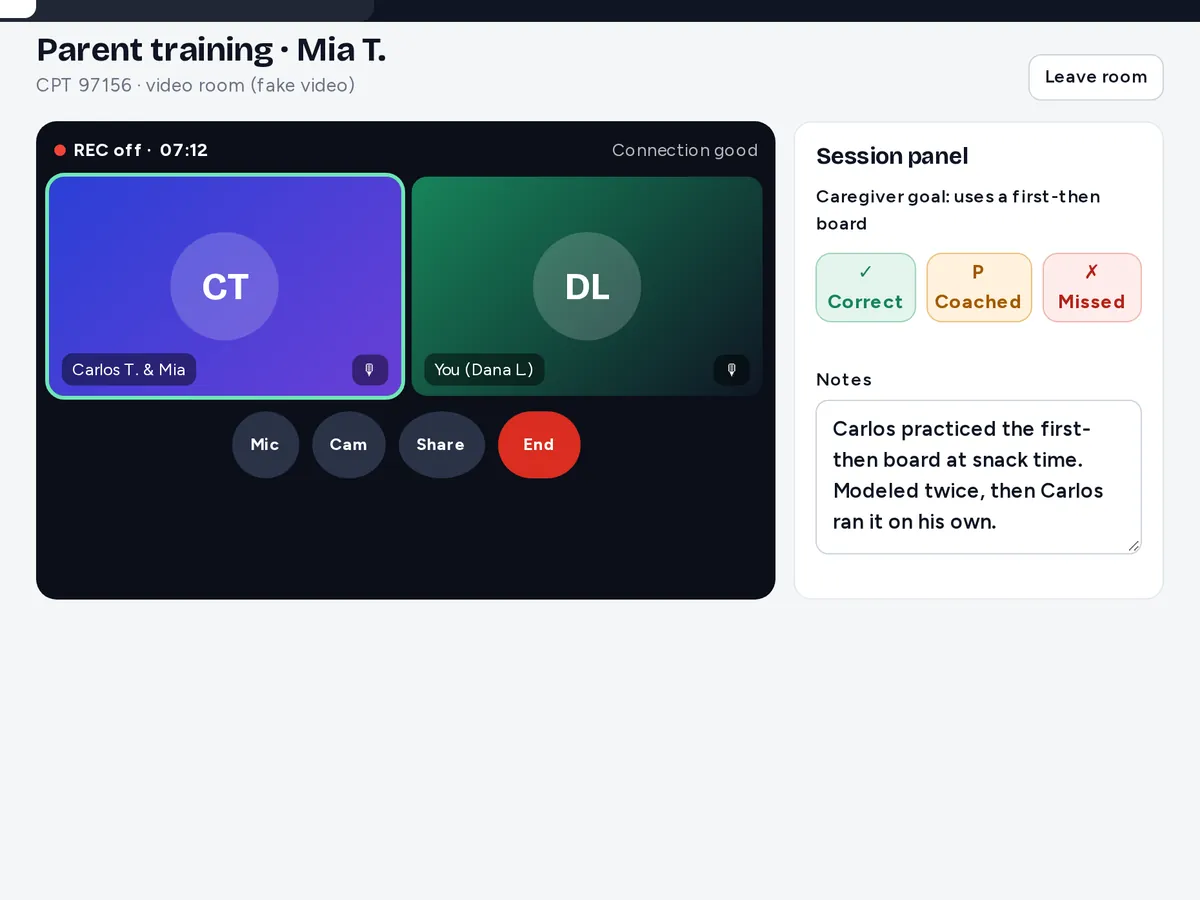
Preview with sample data: Video session screen with the note panel beside it
Preview — sample data
09Coming soon

Built-in video sessions

Telehealth and parent-training sessions inside Mosara, with the note and data panel right beside the video.

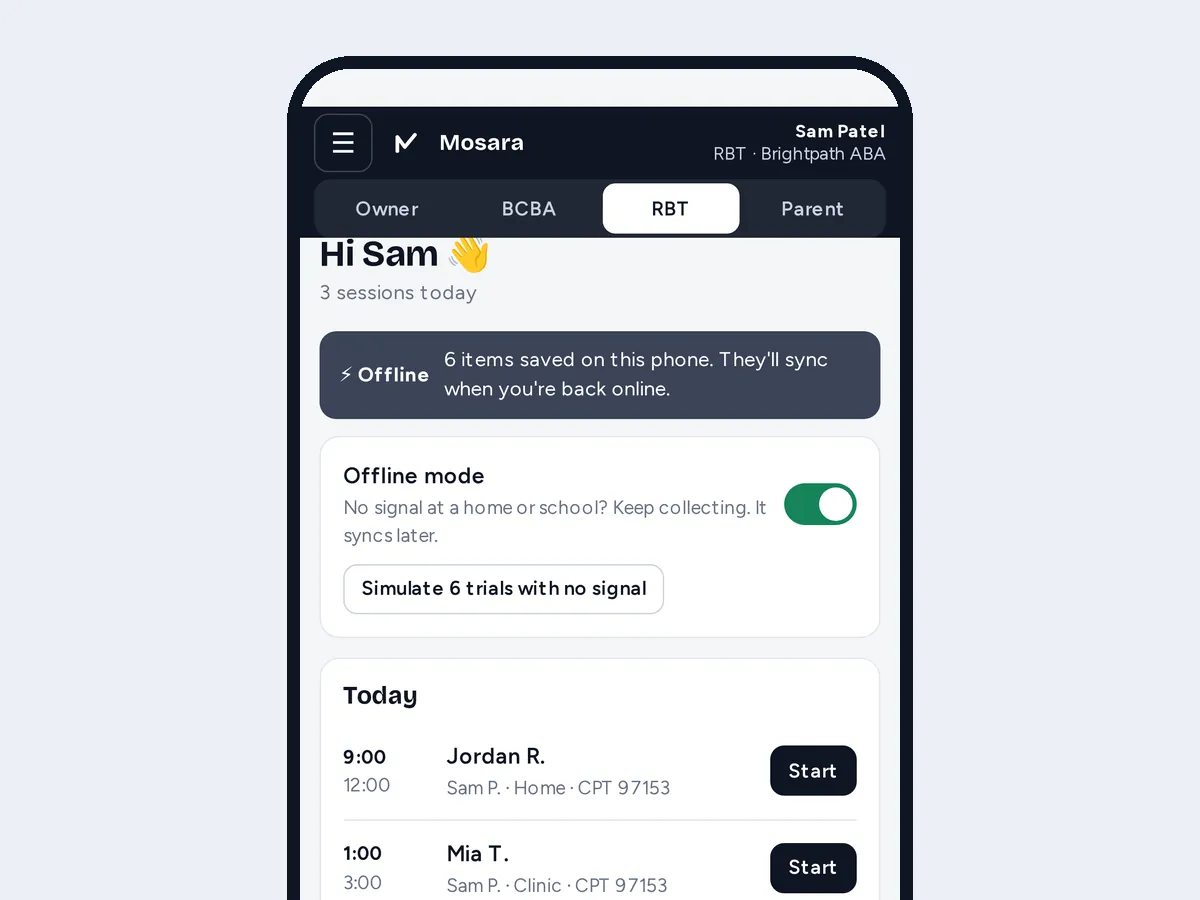
Preview with sample data: Phone screen in offline mode with data saved to sync later
Preview — sample data
10Coming soon

Offline mode for RBTs

No signal at a home or school? RBTs keep collecting data on their phone, and it syncs when they’re back online.

11New — live now

Behavior intervention plans (BIP)

Function-based plans linked to the behaviors you already track, with replacement behaviors, antecedent and consequence strategies, and crisis steps. The BCBA signs, and RBTs see the plan right in the session.

12New — live now

IOA (inter-observer agreement)

A second observer collects alongside the RBT. Total count, interval-by-interval and exact agreement are calculated automatically, with IOA % per program and per staff member.

13New — live now

ABC data + more measures

Record antecedent-behavior-consequence narratives during the session, plus latency and inter-response time alongside today’s frequency, duration and trial data.

No launch dates yet. Want to hear when one goes live, or tell us which you need first? Send us a note.

Pricing

Simple pricing. Pick the plan that fits your team.

7-day free trial — we set it up with you. Trials use sample data only for now.
Every plan: no setup fees · owner & admin logins free · save 10% when you pay yearly.

Starter

For new and small practices

$299/month

or $269/month billed yearly (save 10%)

Up to 5 staff · up to 15 active clients

Start free trial
  • Session notes checked against payer rules before signing
  • BCBA review & co-sign
  • Scheduling: recurring sessions, staff availability, cancellations
  • Data collection on the phone, with auto line graphs
  • Client records and separate logins for owner, BCBA and RBT
  • Parent portal: schedule, note signing, progress
  • Authorization tracking with alerts
  • 30-minute note reminders with escalation
  • Owner dashboard
  • 30-second video walkthroughs
  • User manualComing soon
  • Ask Mosara AI help chatComing soon

Growth

For growing practices

$599/month

or $539/month billed yearly (save 10%)

Up to 20 staff · up to 60 active clients

Start free trial
  • Everything in Starter, plus:
  • Billing: claims built from approved notes, tracked to paid or denied
  • Payroll export: hours from signed notes, drive time, Gusto- and ADP-style CSV
  • Hiring: job posts, applicant board, interview notes
  • Credential alerts for RBT/BCBA, CPR and licenses
  • Compliance reports: late notes, failed checks, review times
  • Your practice’s own rules and deadlines
  • Client & caregiver appointment remindersComing soon
  • Priority support

Practice

For established, multi-BCBA practices

$999/month

or $899/month billed yearly (save 10%)

Up to 50 staff · up to 150 active clients

Start free trial
  • Everything in Growth, plus:
  • Multiple locations, rooms & teams
  • Guided onboarding & data move
  • Dedicated support contact
  • Electronic claim submissionComing soon
  • Audit packet export for payer reviewsComing soon

Need more than this?

Larger group or multiple states? Talk to us about a custom plan.

Talk to us

Have a promo code? Add it when you start your free trial.

Trial, auto-renewal, cancelling and refunds: see Plans & policies.

Upcoming features (see What’s next) will be added to plans as they launch.

Not ready? Try the live demo first, no sign-up.

Need a little more room? Add staff for $45/mo or clients for $15/mo, or move up a plan.

Plans & policies

The fine print, in plain English.

The same terms for every practice, so you know exactly what you’re agreeing to before you sign.

  • 7-day free trialWe set it up with you. No card needed today.
  • Cancel anytimeOne email from the account owner. Confirmed within 1 business day.
  • Refund windows14 days after a first or yearly charge, 7 days after a monthly renewal.
  • Your data stays yoursExport any time, even if a payment fails.
Free trial: how does it work?

Every plan starts with a 7-day free trial. We set it up with you, and no card is needed today. Trials use sample or test data only; real patient information isn’t accepted yet.

  • One free trial per practice.
  • When the 7 days are up, the trial simply ends. Nothing is charged unless you choose a paid plan, give us a payment method and agree to the automatic-renewal terms.
  • Card trials, once online checkout opens Coming soon. If the signup page asks for a card, the trial turns into the plan you picked when it ends, unless you cancel first. We’ll email you at least 2 days before the first charge with the date, the amount and how to cancel.
  • Free passes and promotional trials work the same way: nothing is charged when they end unless you’ve given a payment method and agreed to auto-renewal.
Automatic renewal: what am I agreeing to?

Paid plans renew automatically, monthly or yearly, until you cancel.

  • Each renewal is for the same length (a month or a year) at the then-current price for your plan.
  • Before a paid plan starts, you see the price, the billing period, that it renews automatically and how to cancel, and you agree to it (an unchecked box online, or your written OK if we set it up by email or order form). We email a confirmation afterward.
  • Yearly plans: we email a reminder 30 to 60 days before each renewal, with the date, the price and how to cancel.
  • Price changes: we email you at least 30 days ahead. A new price never applies to a period you’ve already paid for.
  • You can turn off auto-renewal any time. Your plan then ends when the current paid period ends.
How do I cancel?

Email info@mosaraaba.com from the account owner’s email address. We confirm in writing within 1 business day.

  • Cancelling stops all future renewals and charges.
  • Cancel during the free trial: you’re never charged, and access ends when the trial ends.
  • Cancel a paid plan: you keep access until the end of the period you’ve already paid for.
  • Cancel online in the app’s billing settings Coming soon. Email always works too.
  • You can export your data before and after your plan ends (see “Your data” below).
Refunds: what’s the policy?

Clear refund windows, the same for every practice. Signing in doesn’t count as using it.

  • First charge, or a yearly renewal: cancel within 14 days and we refund that charge in full, minus the monthly price for any month in which your team created or signed session notes.
  • Monthly renewal: cancel within 7 days, and if no session notes were created or signed since that charge, we refund it in full.
  • Signing in, visiting billing settings, resetting a password, contacting support, exporting data or cancelling does not count as use.
  • If we’re at fault: if we break our Terms or the BAA and don’t fix it, or we end your account for any reason other than your breach, we refund the unused part of what you prepaid.
  • If we remove a feature that’s a big part of your paid plan and it materially reduces the service, you can cancel and get a pro-rated refund for the rest of your paid period.
  • Extended outages: if we materially fail to provide your plan for an extended period, we give you a reasonable credit or refund.
  • Otherwise fees aren’t refundable, including partial periods, unused staff or client room, and downgrades. Nothing here limits a refund the law requires.
  • To ask for a refund, email info@mosaraaba.com from the account owner’s email address.
Upgrades, downgrades and add-ons

You only pay for what you choose.

  • Go over your plan’s staff or client limit and the app asks you to add room or move up a plan. We never add add-ons unless you choose them.
  • Upgrades and add-ons start right away; you pay the pro-rated difference for the rest of the period.
  • Downgrades and removed add-ons take effect at your next renewal. You’ll need to fit the smaller plan’s limits by then.
  • Prices don’t include taxes.
Promo codes

Promo codes apply as shown at checkout. Add yours when you start your free trial.

  • A code applies only to the plans, billing periods and number of uses stated with it.
  • Codes have no cash value and can’t be combined with other offers unless we say so.
  • We may change or withdraw a code before it’s redeemed.
  • When a discount ends, the regular price on this page applies from the next billing period, under the same auto-renewal terms.
What if a payment fails?

If a payment fails, you keep read-only access and can export everything.

  • We let you know and may retry the charge.
  • If it’s still unpaid 10 days after our notice, we may suspend the account until it’s paid.
  • While suspended, the account owner and admins keep read-only access and can export all data, so you can keep meeting your legal duties, including families’ right to their records.
  • Suspension never deletes your data.
Your data: export and deletion

Your practice owns its data.

  • Export it any time while subscribed, from the app or by emailing info@mosaraaba.com, in a common format such as CSV or PDF.
  • We don’t sell it, use it for ads, or use it to train AI models.
  • After your plan ends you have 30 days to export. Then we delete it from the live service within 30 days, and backup copies are overwritten or deleted within 90 days after that, unless the law requires us to keep them.
  • We email the account owner at least 7 days before we delete anything. You can ask us to delete it sooner.
  • Keep your own copies of records you’re required to retain.
Demo and real patient information

The demo is sample data only. Real patient information isn’t accepted yet.

  • The live demo gives you a private copy of a sample practice with fake data. It’s deleted a few hours after you leave.
  • Real patient information can go in only after you and we have signed the Business Associate Agreement and we’ve confirmed in writing that your account is turned on for it. Until then, use sample or test data only.
  • Please don’t send patient information through the demo, website forms, ordinary email or support chat.
  • Accounts with real patient information must use two-step sign-in for owner and admin logins.
  • AI features stay off for real patient information until our AI provider has signed a BAA with us. Until then they work only with sample data, like in the demo.
What’s live today vs. coming soon

Choose a plan for what works today. Anything marked “Coming soon” isn’t included yet, and we don’t promise if or when it will arrive.

  • Live now: everything on the plans above without a “Coming soon” tag, such as note checks before signing, BCBA review and co-sign, scheduling, data collection, the parent portal, authorization tracking, note reminders, and (on Growth and Practice) claims built from approved notes and tracked to paid or denied, payroll export, hiring, credential alerts and multiple locations.
  • Ask Mosara help assistant in the app Coming soon
  • Plain-English user manual Coming soon
  • Client and caregiver appointment reminders Coming soon
  • Electronic claim submission to payers Coming soon
  • Audit packet export for payer reviews Coming soon
  • Running background checks Coming soon
  • Direct connections to Rethink and CentralReach Coming soon
  • Online checkout and in-app billing Coming soon
  • Auto-drafted session notes, EVV-ready check-in, ABC data with latency and inter-response time, IOA, behavior intervention plans, and treatment plans with progress reports from What’s next New — live now
  • The other 7 features in What’s next (claims sent straight to insurance, eligibility checks, supervision tracker, CEU tracking, parent messaging, video sessions, offline mode) Coming soon
  • Preview and beta features are provided as they are and may change.
If something goes wrong

Mosara helps your team catch issues early. Your team stays in charge of clinical and billing decisions.

  • Note checks are an aid, not a guarantee of any audit result, claim approval or payment. They’re not medical, legal or billing advice.
  • We aim to keep the service up at all times, apart from planned maintenance, but can’t promise it will never go down.
  • Each side’s total liability is limited to the fees paid in the 12 months before the claim. For claims that we broke our confidentiality, data-security or BAA promises (including any unauthorized use or disclosure of patient information), our limit is 3 times that, and reasonable costs of legally required breach notices are covered within it.
  • These limits don’t apply to fees owed, indemnities, gross negligence, willful misconduct or fraud.
  • Disputes: we both try to work it out informally for at least 30 days first. Florida law applies, in the state courts in Miami-Dade County or the federal court for the Southern District of Florida. Where the law allows, both sides give up a jury trial.
Can these terms change?

Only with notice, and never backward.

  • For a material change we email the account owner or tell you in the app at least 30 days before it takes effect.
  • Changes don’t apply retroactively. If you don’t agree, cancel before the change, and it won’t apply for the rest of your paid period.

This is a summary. The Terms of Service are the official version; if anything here differs, the Terms apply. See also our Privacy Policy and Business Associate Agreement. Questions? Ask us or email info@mosaraaba.com.

FAQ

Questions, answered.

Something else? Send us your question or tap Ask Mosara.

What is Mosara ABA?

Mosara is software for ABA practices that helps your team catch session-note issues before signing. Therapists follow a short step-by-step flow, every note is checked against your payer and practice rules (Georgia Medicaid’s ABA manual is built in today), BCBAs review and approve, and owners see where every note stands on the owner dashboard. Passing Mosara’s checks isn’t a payer audit result; it helps your team fix issues early.

How long does it take a therapist to learn?

Most of it is obvious the first time: open today’s session, answer the steps, fix anything Mosara flags, submit. Short video tours for each role are on this page. A plain-English user manual is coming soon.

What does “checked against payer rules” mean?

Mosara turns the requirements in your payer’s policy manual, plus the practice rules you control, into checks: required note elements, service code and credential, authorization units, vague or copied wording and more. Each check shows the section it comes from, and a note can’t be signed until its flags are fixed. It’s a tool for catching issues early, not a guarantee of any payer’s audit outcome.

Which states and payers do you support?

Georgia Medicaid today: the note checker is built on Georgia’s ASD/ABA policy manual (Georgia modifiers, daily unit limits, group sizes, required note elements, Georgia license tracking). It helps catch issues; it doesn’t claim to cover every rule. Other states are coming. Tell us your state and payers here and we’ll tell you where yours stands. You can also set your practice’s own rules.

Who can see our data?

Each person gets their own login with a role: owner/admin, BCBA, or RBT/therapist. Parents get a separate portal that shows only their own child. People only see their own practice’s data, and each role only sees what it needs. A BAA and full security details are available on request before any real client data is used.

What happens when a note is late?

The therapist gets a reminder after the session ends, with a 30-minute deadline you can set (payer deadlines are tracked separately). If the note still isn’t done, it goes to the supervisor, then to the owner.

Can I change a note after it’s signed?

Signed notes are locked. Corrections become a new version and the original stays, so you always have the full version history.

Will this mean double entry?

Mosara now covers scheduling, data collection, session notes, authorizations, billing and payroll export in one place, so it can become your main system once your account is turned on for real patient information. You can also keep Rethink or CentralReach running while your team switches over. Direct connections to them are coming soon, and so is sending claims to payers electronically; nothing syncs automatically yet.

What if a check is wrong?

Your BCBA reviews every flag and makes the clinical call; Mosara never decides for them. Practice rules are rules you control, so your practice can adjust them, and if a payer rule looks wrong, tell us here and we’ll review it.

Is there a free trial?

Yes: every plan starts with a 7-day free trial — we set it up with you. Tap Start free trial, pick your plan and leave your details, and we’ll reach out within 1 business day to get your practice started. Trials use sample or test data only; real patient information isn’t accepted yet. No setup fees. How trials, renewal, cancelling and refunds work: Plans & policies.

Can I try it without signing up?

Yes. Tap Try the live demo and pick Owner, BCBA, RBT or Parent. You get your own private copy of a sample practice with fake data, so click and change anything. It’s deleted a few hours after you leave.

How do I get started?

Try the live demo first, then tap Start free trial or request a demo with your state, practice size and the system you use. We’ll reach out within 1 business day and walk you through it. Already a customer? Log in.

Are the new features available yet? (claims to insurance, auto-drafted notes, EVV, treatment plans, BIPs, IOA…)

Six are live now: auto-drafted session notes (drafted from the session’s data with a fixed template, no AI), EVV-ready check-in with GPS and an optional caregiver signature (for payers that ask for it), ABC data with latency and inter-response time, IOA (inter-observer agreement), behavior intervention plans (BIPs), and treatment plans with progress reports. You can try them in the live demo. The other seven are coming soon and aren’t in the product today: claims sent straight to insurance, eligibility checks, the BACB 5% supervision tracker, BCBA CEU and RBT renewal tracking, parent messaging and reminders, video sessions and offline mode. There are no launch dates yet, and each one will be added to plans as it launches. You can click through how most of them are meant to work in our interactive preview, which uses sample data.
Catch note issues while the session is fresh.

Tell us about your practice and we’ll reach out within 1 business day.